

Santre Sound
Record, edit and mix audio.
Record, edit and mix on a multitrack timeline, then bounce the mix or stems for delivery. Santre Sound is made for producers, podcasters and post teams, and a video track keeps the work in sync with picture.
Alternative to

Harbour lamp launch film mix
Sample content
 Santre Sound
 with fictional sample content. The window follows the layout of the established application it is built on.
What is inside.
Multitrack editing
Shuffle, Slip, Spot and Grid modes set how clips move, and the Smart, Trim and Selector tools shape them. Separate, heal, strip silence, fade, crossfade and adjust clip gain, with undo for every step.
Recording with takes
Punch in and out with pre- and post-roll, or loop-record so each pass lands in its own playlist. Comp the best phrases from the takes into one performance.
A full mixer
Each channel strip has inserts and sends, with busses, aux inputs, VCAs and master faders for routing. Built-in EQ, dynamics, reverb, modulation and pitch processors run live or render onto a selection.
Mix automation
Draw breakpoints for volume, pan, mute, sends and plug-in parameters. Write, Touch, Latch and Trim passes record moves as the session plays.
MIDI and notation
Edit MIDI in a piano roll with a velocity lane or an event list, then quantise and transpose. The Score Editor shows the parts as notation and exports MusicXML.
Bounce for delivery
Bounce the mix or stems to WAV, AIFF or FLAC at 16, 24 or 32-bit float, with dither and normalisation. Each bounce reports peak, true peak and loudness in LUFS.
Loudness on every bounce
Peak, true peak and LUFS are reported for each mix and stem, so delivery specs are easy to check.
Picture in the session
A video track and Video window keep audio edits in sync with the cut.
Surround built in
Surround panners, object and bed routing and a Renderer window cover layouts up to 9.1.6.
In practice.
Produce a podcast episode
Record each host on their own track and use strip silence to clear the gaps. Add EQ and compression on the channel strips, ride the levels with automation, and bounce a WAV while checking the reported loudness.
Mix a voice-over to picture
Load the reference movie onto the video track and spot each line to its timecode. Mix against the picture with the Video window following the playhead, then bounce dialogue and music stems for the edit.
Mix a song from delivered stems
Import the stems, set tempo and meter so the grid lines up, and route groups to busses with their own effects. Automate the final moves and bounce a 24-bit master and a stem set.
Made for
Podcasters and voice talent
Record, clean up, mix and deliver spoken audio with a loudness reading on every bounce.
Video post teams
Edit dialogue and mix voice-over against a picture reference, then hand stems to the editor.
Musicians and producers
Comp takes, edit MIDI and mix songs with automation and built-in effects.
Immersive audio mixers
Pan and route in surround formats up to 9.1.6 and in Ambisonics.
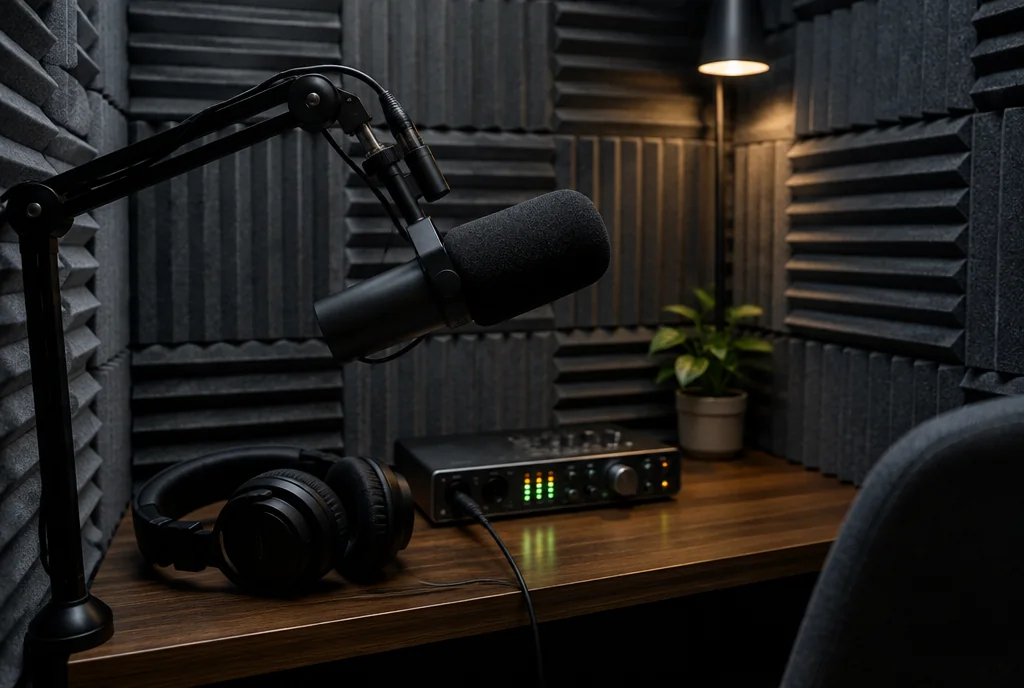
The voice booth: voice-over recorded and mixed in Sound.
Illustrative scene
Opens and saves.
MP3, AAC and Ogg files import but do not export, and video plays as a reference track without video export.
At the desk.
Edit and Mix windows
Switch between the timeline and the mixer, or open the mixer in its own window on a second screen.
Panels that dock
Clips, Tracks and Groups, Memory Locations, Big Counter and Undo History float, stack or close.
Every time scale
Bars and beats, minutes and seconds, timecode with drop-frame, feet and frames, and samples, with tempo and meter maps.
Video window
The picture follows the playhead with a timecode burn-in for spotting.
Keyboard-first editing
Function keys switch edit modes and tools, and menu search finds any command.
Light and dark themes
The theme follows the system appearance or stays fixed.
Good to know.
- Can Santre Sound record from a MIDI keyboard?
- Not yet. Recording from MIDI keyboards and controllers is on the roadmap. Today MIDI can be drawn in the piano roll, typed in with step input or imported from a MIDI file.
- Which formats can Santre Sound bounce to?
- WAV, AIFF and FLAC at 16, 24 or 32-bit float, as a full mix or as stems, with dither and normalisation.
- Does Santre Sound support surround sound?
- Yes. Tracks can be panned and routed in surround formats up to 9.1.6 and in Ambisonics, with a Renderer window for the output.
Explore the Stack.
Every app in the Stack is designed around one sign-in, one profile and one place for files, so work moves between them.
- Image editing
 Santre Photo
- Vector illustration
 Santre Vector
- Video editing
 Santre Film
- Photo library and RAW
 Santre Light
- PDF editing
 Santre PDF
- Motion graphics and VFX
 Santre Effects
- Page layout and publishing
 Santre Layout
- Interface design
 Santre Interface
- Word processing
 Santre Docs
- Presentations
 Santre Deck
- CAD and drafting
 Santre CAD
- Spreadsheets
 Santre Grid
- Document intelligence
 Santre Document Intelligence